Windows 10 (version 1607) – Aug, 2016 – Anniversary Update
Windows 10 version 1607, also known as the Windows 10 Anniversary Update, is one of the most significant updates released for the Windows 10 operating system. Microsoft officially released this update in August 2016, approximately one year after the initial launch of Windows 10.
With its numerous improvements and new features, version 1607 played a pivotal role in enhancing system stability, security, and functionality. Furthermore, Windows 10 version 1607 was designed to improve system productivity and performance. Microsoft focused on enhancing existing features, adding powerful tools for developers, businesses, and everyday users.
As a result, the update improved the Start menu, the Microsoft Edge browser, and expanded the capabilities of the Cortana digital assistant. Consequently, users enjoyed a smoother and more efficient computing environment.
The Windows 10 Anniversary Update (version 1607) also reinforced Microsoft’s vision of Windows as a constantly evolving platform. Instead of releasing entirely new operating systems, Microsoft continued to offer significant feature updates, progressively improving the Windows environment.
Key Features of Windows 10 Version 1607:
Windows 10 version 1607 introduced several key features designed to improve productivity, security, and the overall user experience.
Redesigned Start Menu:
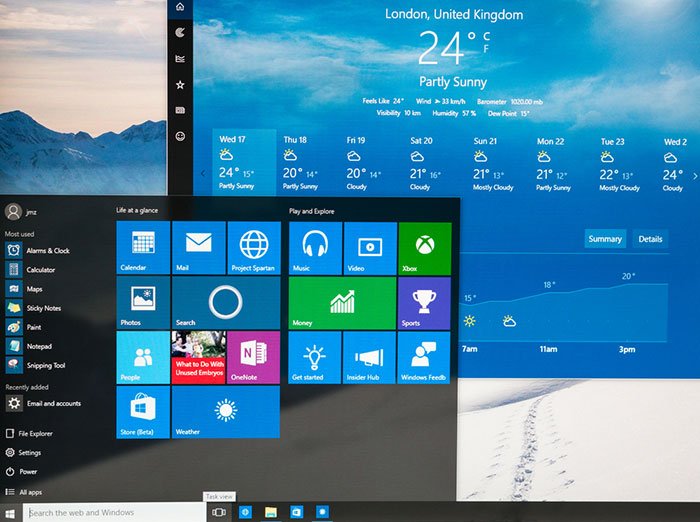
First, the update introduced a new design for the Start menu. The list of installed apps became more accessible, and it was easier to find frequently used applications. Additionally, the power and settings shortcuts were reorganized for improved usability. As a result, navigating the Start menu became faster and smoother.
Windows Ink Workspace:
Another key feature introduced in version 1607 was the Windows Ink Workspace. This tool allows users to write, draw, and annotate directly on the screen using a stylus or digital pen. With this capability, artists, students, and professionals can easily take notes, sketch ideas, or annotate documents.
Cortana Improvements:
The Cortana digital assistant received significant improvements in this update. Cortana can now be accessed directly from the lock screen, and its reminder features have been enhanced. Users can now create reminders based on time, location, or contacts more efficiently.
Microsoft Edge Improvements:
Windows 10 version 1607 has improved the Microsoft Edge browser with new features and performance enhancements. A key improvement is the addition of browser extensions. Users can now add tools such as ad blockers and productivity extensions to enhance their browsing experience.
Dark Mode Support:
Another popular feature added in the Anniversary Update is Dark Mode. This mode changes the system interface to dark colors, helping to reduce eye strain and giving it a modern look.
Windows Hello App Compatibility:
The update also expanded Windows Hello, allowing apps and websites to use biometric authentication. Users can now securely log in with their fingerprint or facial recognition.
What’s New in Windows 10 Version 1607?
In addition to feature enhancements, Windows 10 version 1607 introduced several new technologies and improvements that strengthened the overall Windows environment.
Windows Subsystem for Linux:
One of the most notable new features was the Windows Subsystem for Linux (WSL). This feature allows developers to run Linux command-line tools directly from within Windows. As a result, they can use Linux tools without needing to install a separate operating system.
Improved Notification System:
The Action Center received several improvements, including better grouping and synchronization of notifications across devices. This allows users to manage alerts and messages more efficiently.
Enhanced Security Features:
Microsoft introduced additional security tools in version 1607. These enhancements include Windows Defender, Device Guard, and Credential Guard. As a result, systems are better protected against malware and unauthorized access.
Improved Taskbar Functionality:
The taskbar has also been updated with new features, such as improved calendar integration and easier access to notifications.
You may also Download:
System Requirements for Windows 10 Version 1607:
Before installing Windows 10 version 1607, it’s important to ensure your system meets the necessary hardware requirements.
Minimum System Requirements:
Processor:
1 GHz or faster processor, or System on a Chip (SoC)
Random Access Memory (RAM):
1 GB for 32-bit systems
2 GB for 64-bit systems
Storage Space:
16 GB for 32-bit systems
20 GB for 64-bit systems
Graphics Card:
DirectX 9 compatible graphics card with WDDM 1.0 driver
Display:
800 x 600 screen resolution or higher
Internet Connection:
Required for updates and some features
While these requirements are relatively low, higher-spec hardware will significantly improve system performance and responsiveness.
Frequently Asked Questions:
1. What is Windows 10 version 1607?
Windows 10 version 1607 is an annual update released in August 2016, introducing several improvements and new features to the Windows 10 operating system.
2. Why is it called version 1607?
The number 1607 refers to the year and month of release, July 2016, although it was officially released in August 2016.
3. What is the main feature added in this update?
One of the most important features is the Windows Subsystem for Linux (SSL), which allows developers to run Linux tools directly on Windows.
4. Is Microsoft Edge improved in version 1607?
Yes. Microsoft Edge gained support for extensions, improved performance, and enhanced security features.
5. Is Windows 10 version 1607 still supported?
No. Microsoft has discontinued support for this version, as it has been replaced by newer updates.
Homepage: windowstan.info
Post Comment