Windows 10 (version 1903) Free Download
Windows 10 version 1903, also known as the May 2019 Update, is one of the most significant updates for the Windows 10 operating system. Microsoft officially released it in May 2019, focusing on improving system performance and stability while giving users greater control over updates.
As a result, version 1903 introduced a number of improvements that optimized the usability and reliability of Windows 10 for both home and business users. Furthermore, the May 2019 Update focused on giving users greater control over the installation and management of updates.
Previously, many users encountered unexpected system updates; however, version 1903 offered better update management options, allowing users to pause and install updates at a more convenient time. This resulted in a more flexible and straightforward update experience.
Windows 10 version 1903 also included several visual, performance, and security improvements. For example, the update introduced a light theme, improved the Windows Sandbox environment, and expanded the security features of Windows Defender. As a result, version 1903 significantly improved the overall performance of Windows 10 while maintaining compatibility with a wide range of devices.
Key Features of Windows 10:
Windows 10 version 1903 introduced several important features designed to improve productivity, security, and system performance.
The New Light Theme:
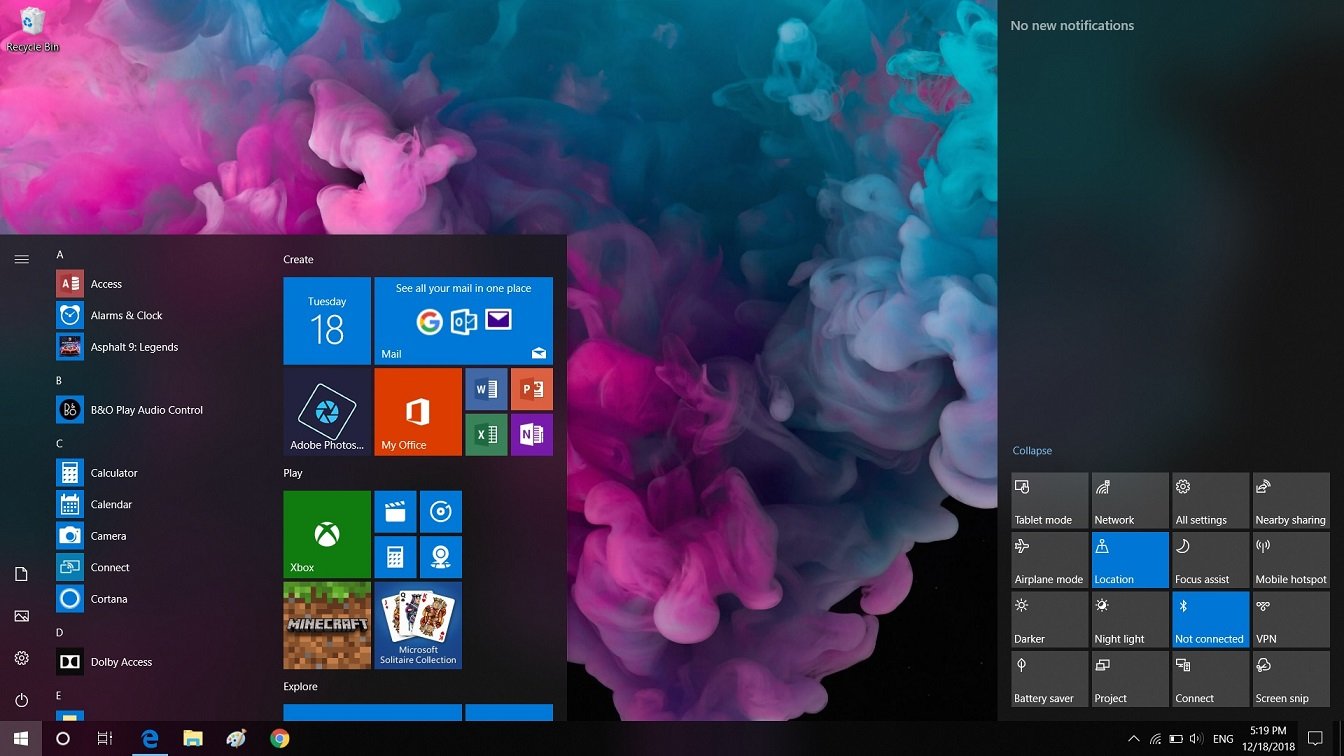
One of the most noticeable visual improvements in version 1903 was the introduction of the light theme. Unlike the previous default interface, the new light theme offers a brighter and cleaner look for the Start menu, taskbar, and system interface. As a result, the operating system looks more modern and visually appealing.
Windows Sandbox:
Another key feature introduced in the May 2019 Update is the Windows Sandbox environment. This feature allows users to run applications in an isolated virtual environment. Thanks to this capability, potentially unsafe programs can be tested without affecting the main operating system. In this way, the Windows sandbox provides an additional layer of security for developers and advanced users.
Windows Search Improvements:
Microsoft has improved the Windows search experience by separating it from the Cortana digital assistant. This makes searching for applications, files, and settings faster and more accurate. In addition, the updated search interface displays clearer categories for easier navigation.
Reserved Storage:
Windows 10 version 1903 introduced the Reserved Storage feature, which automatically allocates a portion of disk space for system updates and temporary files. As a result, future updates can be installed more smoothly without storage space issues.
Start Menu Improvements:
The Start Menu has received several performance improvements in version 1903. By now running as a separate process, system stability is improved, and the Start Menu is more responsive.
Automatic Troubleshooting:
Another useful feature is Automatic Troubleshooting, which allows Windows to automatically detect and fix common problems. Therefore, users can resolve many system issues without manual intervention.
What’s New in Windows 10 Version 1903?
The May 2019 Update introduced several improvements that optimized system usability, security, and performance.
Improved Control over Windows Updates:
One of the most significant changes in version 1903 is the improved control over Windows updates. Users can now pause updates for longer periods and choose when to install major updates. As a result, system interruptions caused by automatic updates have been significantly reduced.
Windows Defender Security Enhancements:
Microsoft has strengthened Windows Defender security tools by adding new features to protect against modern threats. This provides users with enhanced protection against malware, ransomware, and suspicious applications.
Enhanced Gaming Experience:
Windows 10 version 1903 also introduced improvements for gaming. For example, the Game Bar interface was updated with improved performance monitoring and easier access to gaming tools. This allows gamers to monitor system performance more effectively.
You may also Download:
System Requirements for Windows 10 Version 1903:
Before installing Windows 10 version 1903, users should ensure their systems meet the necessary hardware specifications.
Minimum System Requirements:
- Processor:
1 GHz or faster processor, or a compatible System on a Chip (SoC). - Random Access Memory (RAM):
1 GB for 32-bit systems
2 GB for 64-bit systems - Storage Space:
32 GB of available storage space - Graphics Card:
DirectX 9 or later with WDDM 1.0 driver - Display:
800 x 600 screen resolution or higher - Internet Connection:
Required for updates, activation, and some features.
Although these requirements are relatively low, higher-spec hardware will provide superior performance and smoother multitasking.
Advantages and Disadvantages of Windows 10 Version 1903:
Advantages:
- The light theme provides a modern and visually appealing interface.
- Windows Sandbox provided a robust security tool for safely testing applications.
- Improved Windows Update control allowed users to manage updates more efficiently.
- The update improved system performance and startup speed.
- Enhanced security features in Windows Defender strengthened overall system protection.
Disadvantages:
However, Windows 10 version 1903 had some limitations.
- The Reserved Storage feature used a portion of disk space, which might be inconvenient for devices with limited storage capacity.
- Some users experienced compatibility issues with older device drivers.
- Windows Sandbox required specific hardware specifications and was not available on all Windows editions.
- Microsoft discontinued support for version 1903 due to the release of newer updates.
Additional Features and Capabilities:
Improved File Explorer:
Windows 10 version 1903 introduced performance improvements to File Explorer, enabling faster file browsing and management.
Improved System Performance:
The update introduced several improvements that enhanced system startup speed and responsiveness.
Improved Update Installation:
Microsoft redesigned the update installation process to reduce system downtime during updates.
Improved Font Management:
Users can now install and manage fonts more easily through the Settings app.
Enterprise Security Enhancements:
Businesses benefited from improved enterprise device management tools, which helped them manage system security more effectively.
Frequently Asked Questions:
What is Windows 10 version 1903?
Windows 10 version 1903 is the May 2019 Update, which introduced new features such as a light theme, Windows Sandbox, and improvements to update controls.
Why is it called version 1903?
The version number represents the development date, which in this case is March 2019.
What is Windows Sandbox?
The Windows Sandbox environment is a secure virtual environment that allows users to test applications without affecting the main operating system.
What is reserved space?
Reserved space is a portion of disk space allocated for Windows updates and system files.
Did Windows version 1903 improve Windows updates?
Yes. Microsoft added better controls that allow users to pause updates and install them at their convenience.
Homepage: windowstan.info
Post Comment