Windows 10 (version 1507) Free Download
Windows 10 – July 2015 (version 1507) is the original version of the Windows 10 operating system developed by Microsoft. Officially released on July 29, 2015, this version marked a significant advancement for the Windows environment.
Unlike previous operating systems, which were released as standalone versions every few years, Windows 10 offered a modern platform designed for continuous development through regular updates. As a result, version 1507 laid the foundation for the future development of Windows. Furthermore, Windows 10 version 1507 sought to address the challenges users faced with previous versions, such as Windows 8 and Windows 8.1.
Many users desired a more familiar desktop environment with modern features and touchscreen support. Therefore, Microsoft redesigned many essential components, such as the Start menu, Task Manager functions, and the system interface. This resulted in a balanced experience that combined the ease of use of traditional desktop features with modern computing capabilities.
Furthermore, the release of Windows 10 in July 2015 (version 1507) introduced new technologies focused on productivity, security, and cross-device compatibility. Designed to run on desktops, laptops, tablets, and hybrid devices, it became one of Microsoft’s most ambitious platforms.
Key Features of Windows 10 July 2015 (version 1507):
Windows 10, version 1507, introduced several innovative features designed to improve usability, system performance, and overall functionality.
Redesigned Start Menu:
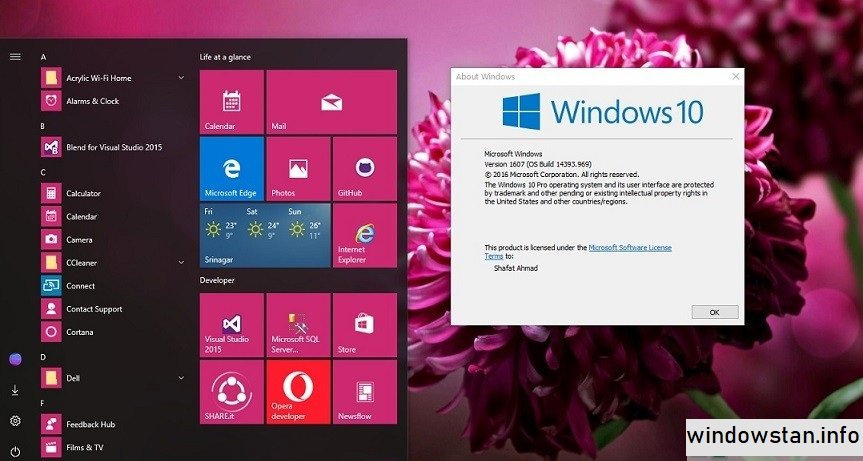
First, the operating system brought back the Start Menu, which many users missed in Windows 8. However, this version combined the classic Start Menu design with modern live tiles. Thanks to this hybrid design, users can quickly access applications while simultaneously viewing dynamic information such as weather updates, news, and notifications.
Cortana Digital Assistant:
One of the most notable new features in version 1507 was Cortana, Microsoft’s digital assistant. Cortana allows users to perform searches, set reminders, check schedules, and manage tasks using voice commands or text input. This makes daily interactions with the computer more efficient and seamless.
Microsoft Edge Browser:
Windows 10 version 1507 introduced Microsoft Edge, which replaced Internet Explorer as the default web browser. Edge was designed to offer greater speed, better compatibility with modern websites, and enhanced security features. As a result, users enjoyed faster browsing and improved web performance.
Virtual Desktops:
In addition, Windows 10 introduced Virtual Desktops, which allow users to create multiple desktop environments. By organizing different applications on separate desktops, multitasking becomes simpler and more efficient.
Action Center:
The Action Center is another important new feature. This feature consolidates system notifications, alerts, and quick settings into a single panel. This allows users to quickly and easily manage Wi-Fi, Bluetooth, display settings, and other system functions without having to navigate through complex menus. Windows Hello
DirectX 12 Support:
In addition, the operating system includes DirectX 12, which significantly improves game performance and graphics efficiency. Thanks to this technology, communication between hardware and software is optimized, resulting in smoother gameplay and improved visual quality.
What’s New in Windows 10, Version 1507?
The July 2015 release of Windows 10 introduced several significant changes compared to previous Windows operating systems.
Windows as a Service (WaaS):
One of the most notable innovations is the Windows as a Service (WaaS) model. Instead of releasing entirely new operating systems, Microsoft began offering continuous updates and feature enhancements. Therefore, Windows 10 evolves through periodic updates rather than major version upgrades.
Universal Windows Platform (UWP):
Another important innovation was the Universal Windows Platform (UWP). This development framework allows applications to run on multiple Windows devices, such as PCs, tablets, and some embedded systems. This enables developers to create applications that work efficiently across different devices.
Snapdown Assistant Improvements:
Windows 10, version 1507, improved the Snapdown Assistant feature, which allows users to easily arrange multiple windows on the screen. By dragging windows to different edges of the screen, users can automatically organize their workspace, improving multitasking productivity.
Integrated Cloud Services:
Windows 10 has added broader cloud integration through Microsoft’s OneDrive service. Users can sync files across devices, ensuring easy access to documents and media files wherever they need them.
Enhanced Gaming Features:
In addition, It offers enhanced gaming integration with Xbox services. This integration allows gamers to access Xbox Live features, record gameplay videos, and connect with gaming communities.
You may also Download:
Windows 10 System Requirements – July 2015 (version 1507):
Before installing this version 1507, it’s important to ensure your PC meets the required hardware specifications.
Minimum System Requirements:
- Processor:
1 GHz or faster processor, or system-on-a-chip. - RAM:
1 GB for 32-bit systems.
2 GB for 64-bit systems. - Storage:
16 GB for 32-bit systems.
20 GB for 64-bit systems. - Graphics Card:
DirectX 9 compatible graphics card with WDDM driver. - Display:
800 x 600 resolution or higher. - Internet Connection:
Required for updates and some system features.
While these requirements are relatively modest, more powerful hardware will significantly improve performance.
Additional Features and Capabilities:
Tablet Mode:
Its version 1507 introduced Tablet Mode, which optimizes the user interface for touch devices. This allows users of laptops or hybrid tablets to switch between desktop and touch-compatible layouts.
Improved Task Manager:
The improved Task Manager provides detailed information about system performance. Users can more efficiently monitor CPU usage, memory consumption, and running processes.
File Explorer Enhancements:
Windows 10 File Explorer now includes a Quick Access section that allows users to quickly access frequently used folders and files.
Windows Store:
The integrated Windows Store allows users to download apps, games, and digital content directly from the Microsoft online store.
Security Enhancements:
Windows Defender Antivirus, firewall improvements, and Secure Boot support enhance the overall security of the operating system.
Frequently Asked Questions:
1. What is Windows 10 version 1507?
Windows 10 version 1507 is the original version of the Windows 10 operating system, released in July 2015.
2. Why is it called version 1507?
The version number represents the release date. 1507 refers to the year 2015 and the month of July.
3. Is Windows 10 version 1507 still supported?
No. Microsoft discontinued support for version 1507 after the release of subsequent Windows 10 updates.
4. Which browser was introduced in Windows 10 version 1507?
Microsoft Edge was introduced as the default web browser.
5. Is Windows 10 version 1507 compatible with games?
Yes. It includes DirectX 12, which improves game performance and graphics capabilities.
Homepage: windowstan.info
Post Comment